Website · Theme Builder
Design your booking website with a live preview
Pick one of ten professional themes, then change colours, fonts, header, footer and every home page block, with nothing going live until you press Publish.
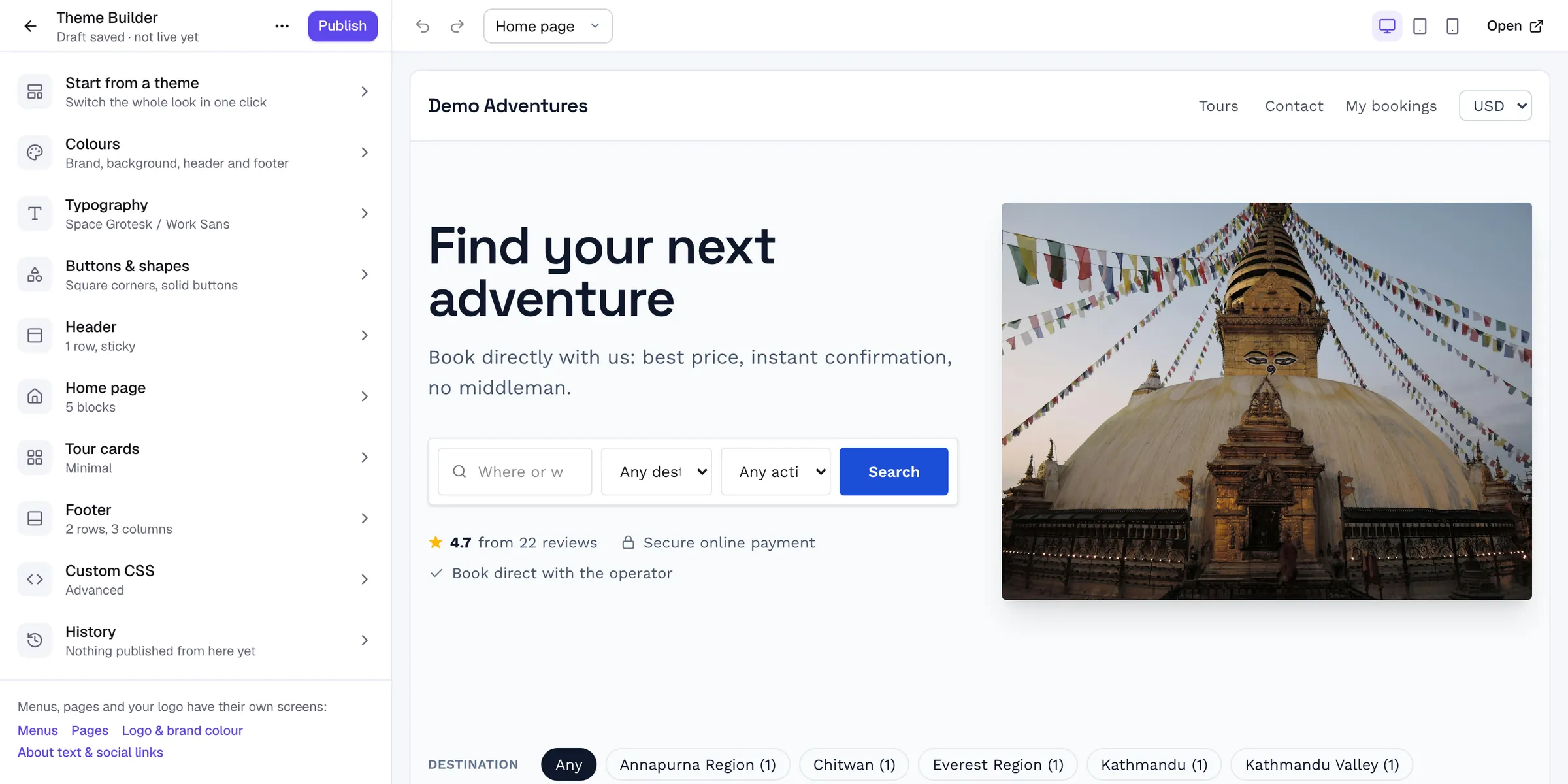
Overview
Theme Builder at a glance
Your theme decides how the whole website looks: colours, fonts, shapes, the header, the footer and the home page. Every theme is built for selling tours, with tour search, clear prices and booking buttons in the right places, and every one works on phones.
The Theme Builder opens full screen with settings on the left and your real website on the right. Click any part of the preview to jump to its settings, switch between desktop, tablet and phone, and undo freely. Changes save as a draft until you publish them.
Capabilities
What's included
-
Ten themes
Six themes on every plan (Summit, Expedition, Heritage, Coastal, Jungle, Minimal) and four premium themes on Growth and Scale. Switching keeps your content.
-
Header builder
Three rows with left, centre and right zones for logo, menus, search, phone, a Book now button, currency and My bookings. Sticky or transparent over the hero, with a separate phone header.
-
Footer builder
Up to three rows of one to four columns, with widgets for tours, destinations, contact, social links, your review rating and secure payments.
-
Home page blocks
Hero, tours, destinations, activities, why us, reviews, blog, FAQ, gallery, video, stats, contact and more, each with its own style and the option to hide on phones or computers.
-
Brand controls
Primary and accent colours or your brand colour, page and card colours, curated heading and body fonts, corners and button styles, plus custom CSS for fine-tuning.
-
Drafts and history
Autosaved drafts, a private preview link, and the last 30 published versions to restore. Save designs as your own themes, or export and import them.
How it works
Theme Builder, step by step
- 1
Choose a theme
Preview any theme with your own content, then activate it.
- 2
Customise
Change colours, fonts, header, footer and home page blocks in the builder.
- 3
Preview
Check every page on desktop, tablet and phone with a private preview link.
- 4
Publish
Make the draft live in one click, and restore an earlier version any time.
Integrations
Extend theme builder
Switch these on in one click from your console.
Payments
Currency switcher
Let travellers pay in their own currency. You set real prices per currency on each tour (no surprise exchange rates); tours you haven’t priced stay in your main currency, clearly labelled “Charged in …”, optionally with an approximate converted price.
Website
White label
Remove every “powered by Tourtify” mention from your website, emails, PDFs and proposals, so travellers only ever see your brand.
Will switching themes delete my content?
No. Switching keeps your hero text and photo, home page blocks, menus and footer. Premium themes may add their signature blocks, which you can hide or remove.
Do I need to know code?
No. Everything is visual. Custom CSS is available for fine-tuning if you want it.
Can two people edit at once?
If the draft changes in another tab or by a teammate, the builder warns you and lets you load their version or keep yours.
Related features
Works well with
Start selling tours direct
Try Tourtify free for 30 days. Add your tours, pick a theme and take your first booking today.