Operations
Run every departure from one place
Know who's coming, what they've paid and what's still missing. Your team works from the same live data, from the office to the meeting point.
On the day
Check travellers in at the meeting point
Guides open the manifest on their phone, scan QR tickets and see who has signed the waiver or still owes a balance.
- QR tickets on every booking
- Waivers signed online or on a tablet
- Traveller details collected before departure
Heritage Walk · 08:00
Meeting point: Durbar Square gate
Lena Fischer
2 travellers · Waiver Signed
Rahul Mehta
1 traveller · Waiver Signed
Sophie Martin
3 travellers · Waiver 1 of 3
Kenji Watanabe
2 travellers · Waiver Signed
Before departure
Every traveller ready before the day
Collect the details you need in advance and see at a glance who is still missing something, departure by departure.
- Traveller details forms for passports, dietary needs and emergency contacts
- Waivers signed online before arrival
- Balances due shown next to each booking
Entry ticket
Sky Garden Observatory
- Date
- Sat 14 Nov
- Entry
- 10:30
- Tickets
- 2 Adult, 1 Child
- Ref
- TT-3M7Q2A
What's included
Everything in operations
- Dashboard
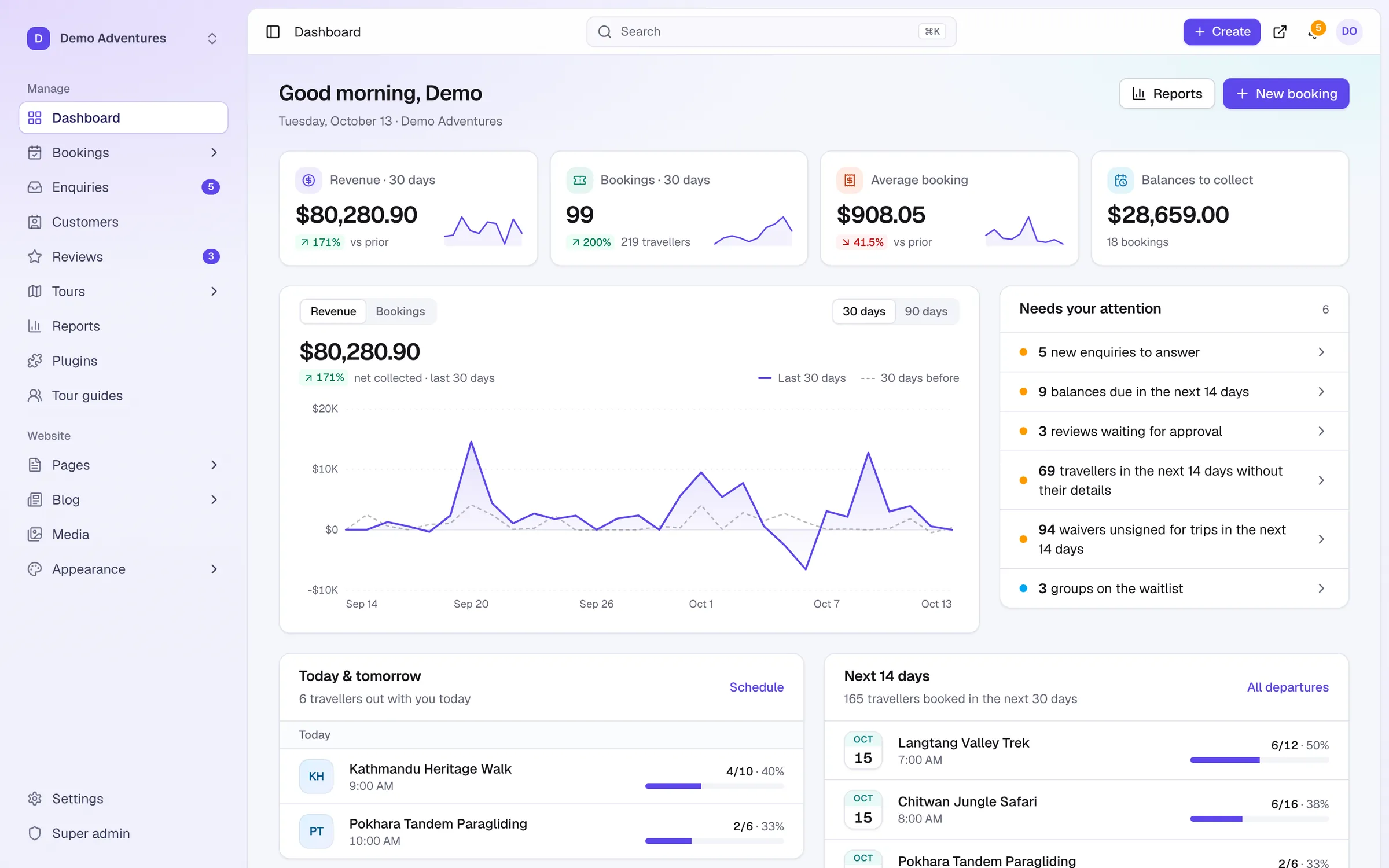
- Revenue, bookings, balances due and what needs attention today.
- Manifests
- Printable and mobile manifests for every departure.
- Tour guides
- Assign guides to departures; they accept or decline, and unanswered requests are chased.
- Reports and exports
- Revenue by booking or trip date, scheduled report emails, PDF and CSV exports.
- Field staff app
- Install on a phone: today's departures, manifests and check-in, even offline, plus push notifications.
- Shared inbox
- Email, WhatsApp, SMS, website chat and enquiries in one place, linked to bookings.
- Trekking operations
- Permits by nationality, documents, crew, lodges and safety check-ins.
- Import your history
- Customers and bookings from FareHarbor, Rezdy, Bókun, Peek Pro, Checkfront or a spreadsheet.
- Team roles
- Owners, admins, sales agents and guides each see what they need, plus custom access groups.
- Your team's language
- The console works on phones and tablets, in English and 14 other languages, including right-to-left.
Add more with plugins
All pluginsQR tickets & check-in
Every confirmed traveller gets a ticket with a QR code. Scan it with a phone at the meeting point to check them in. Duplicates, cancelled bookings and the wrong day are caught.
Traveller details
Collect passport, date of birth, dietary needs and emergency contacts after booking, per traveller. Checkout stays short; you get everything before the trip.
Waivers & consent
Each traveller signs your waiver or terms online before the trip, or on site. We keep the exact text they signed, with time, IP and a tamper-evident seal.
Tour guides
Create guide profiles and assign them to departures. Show guide bios and photos on tour pages. Automatically notify guides when new bookings are confirmed.
Resources & tasks
Assign vehicles, boats, equipment and venues to departures without double-booking them. Checklists per tour create tasks when a departure gets its first booking. One schedule of every guide, vehicle and resource with drag to reassign, conflicts checked every morning, and a private calendar feed for each team member and vehicle.
Costs & profit
Record what each departure costs: drivers, hotels, park fees, meals. Default costs per tour fill in automatically, guide pay and agent commission are counted, and you see the real profit, margin and break-even of every departure and tour.
Features
Explore operations in detail
Booking management
One list for website, staff and partner bookings, with views for upcoming trips, balances to collect and payments to check, and a booking page with everything in one place.
Manifests & check-in
A live passenger list for every departure: who's coming, what's still to pay, dietary and emergency details, waivers, and who has arrived.
Field staff app
Install the console on a phone or tablet. Guides see today's departures with the manifest, check travellers in offline and get push notifications for new assignments; the till reloads offline too.
Trekking & expedition operations
Work out every trekker's permits and fees from their nationality, collect passports and rescue insurance, plan crew, lodges and altitude day by day, and keep in touch with groups on the trail.
Shared inbox
Email, WhatsApp, text messages, website chat and enquiries arrive in one place, linked to the customer and their bookings, so your whole team answers with the full picture.
Reports & dashboard
Revenue by booking date or by trip date, money collected, conversion and balances, compared with the period before, with PDF and CSV exports and scheduled report emails for your accountant.
Enquiries inbox
Questions from tour pages, sold-out date requests, contact messages and booking requests land in one inbox, ready to answer and turn into bookings.
Team & roles
Invite guides, office staff and partners with their own sign-in. Owner, admin, sales agent and guide roles decide what each person can see and do.
Console languages
Use the Tourtify console in English or 14 other languages, on a computer, tablet or phone. Each person picks their own; Arabic and Hebrew switch to right-to-left.
Import customers & bookings
Import customers and bookings from FareHarbor, Rezdy, Bókun, Peek Pro, Checkfront or any spreadsheet, with a dry run that checks every row before anything changes.
How it works
Operations, step by step
- 1
A booking arrives
It appears on the dashboard and the departure's manifest straight away.
- 2
Details are collected
Travellers fill in forms and sign waivers from their booking link.
- 3
Your team prepares
Guides see their departures; manifests show who still needs something.
- 4
Check-in on the day
Scan QR tickets at the meeting point and see who has arrived.
Can guides use their phones?
Yes. Manifests and ticket scanning work in the field staff app, installed from the phone's browser with no app store, and it keeps working offline.
Can I collect passport and dietary details?
Yes. Traveller details forms ask for exactly what each tour needs, before departure.
Can waivers be signed on the day?
Yes. Travellers sign online in advance, or on a tablet at check-in.
Can I give staff limited access?
Yes. Roles let owners, admins, sales agents and guides each see only what they need, and custom access groups go further.
More of the platform
Start selling tours direct
Try Tourtify free for 30 days. Add your tours, pick a theme and take your first booking today.