Online booking
A checkout travellers actually finish
Real-time availability, the real price for their group on every date and a short, clear checkout. Seats are held while they pay, so you never oversell.
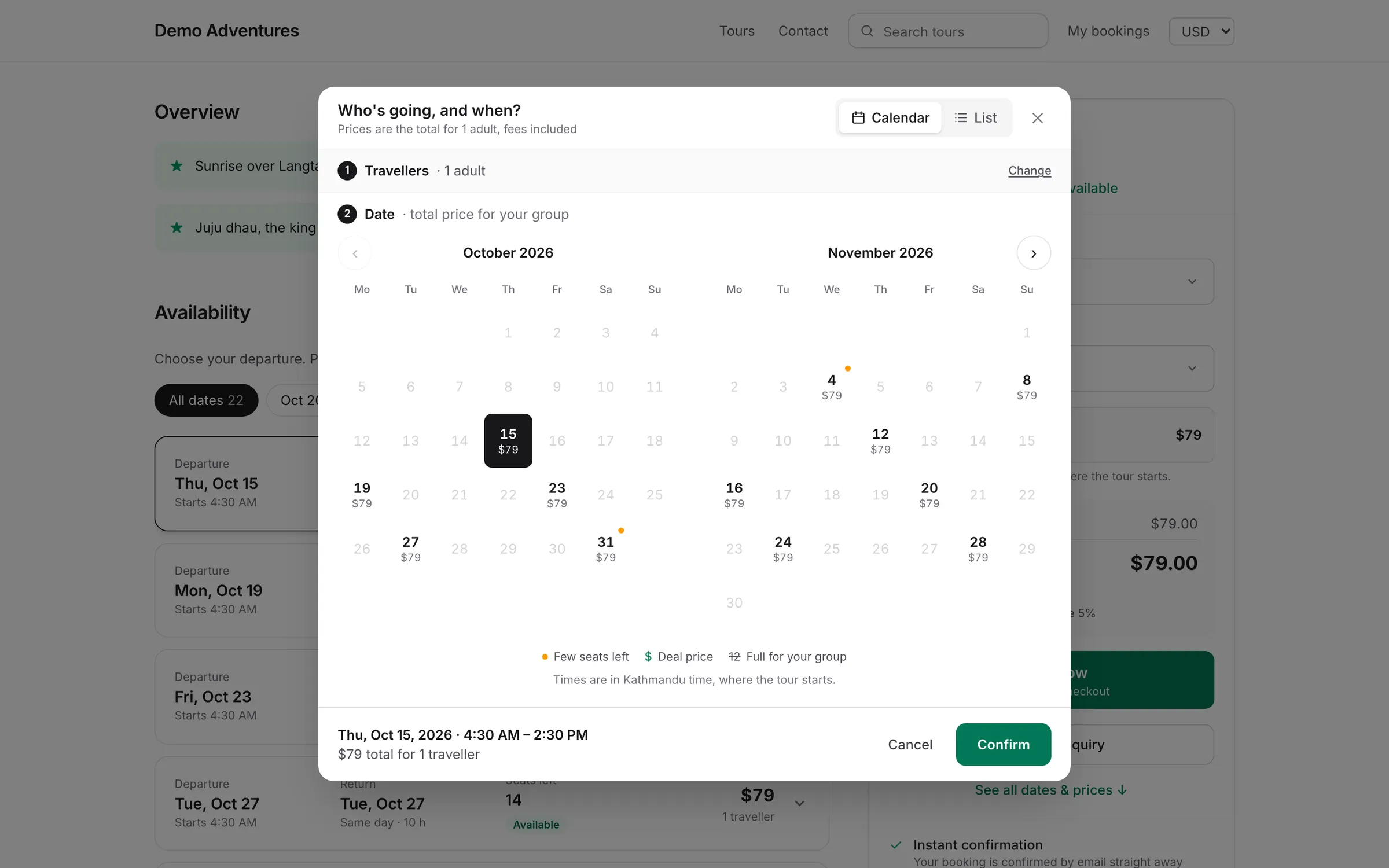
Availability
Dates, times and seats at a glance
A calendar and list view show which dates work and what they cost for the whole group. Several start times a day, each with its own capacity.
- Per-date group prices
- Multiple start times per day
- Cut-off times and blocked dates
Sat 14 November
3 travellersChoose a start time
$64 pp
3 left
$59 pp
12 left
Sold out
$69 pp
6 left
Checkout
A checkout that answers every question
Travellers see the price for their group, choose extras, enter a promo code or voucher and pay securely, with your cancellation terms right next to the button.
- The real total for the whole group, fees and taxes included
- Deposits or full payment, decided by your rules
- Guest checkout, with a secure link to manage the booking later
12 days · Small group
Annapurna Base Camp Trek
November 2026
2 adults
Free cancellation up to 30 days before
What's included
Everything in online booking
- Traveller types
- Adults, children, seniors or your own types, each with a price, minimum and maximum.
- Seats held at checkout
- Availability is reserved while the traveller pays and released if they leave.
- Guest checkout
- No account needed. Travellers manage their booking from a secure link.
- Cart for several tours
- Book more than one tour or date in a single checkout.
- Clear cancellation terms
- Your policy is shown before payment, at checkout and in every email.
- Booking changes
- Move a booking to another date or change travellers from the console.
Add more with plugins
All pluginsAdd-ons & extras
Sell extras at checkout: airport transfers, gear rental, travel insurance, single-room upgrades. Priced per booking, per traveller, per night or per item, with quantity limits, shared daily stock and a question per extra (e.g. shoe size).
Discounts
Every discount in one place, shown on your website and applied at checkout. Promo codes and automatic discounts (Starter): codes and links with rules and limits, and no-code discounts for early bird, last minute, minimum spend and travel dates. Group discounts and dynamic pricing (Growth): savings for bigger groups, and prices that move with demand and season.
Waitlist
Let travellers join a waitlist for full departures. When seats free up, the next in line whose group fits gets the seats held for a few hours, then they pass to the next.
Features
Explore online booking in detail
Online checkout
One clear price with fees and taxes included, seats held while travellers pay, no account to create, and a confirmation with a PDF the moment payment succeeds.
Departures & availability
Add a whole season of departures in one step, set seats per departure, block dates and set booking cut-offs. Seats are held while travellers pay, so two people can never buy the last seat.
Booking modes
Choose how travellers book each option: pay straight away, send a request for you to confirm, or ask for a tailored quote. Mix modes on the same tour.
Pricing, options & taxes
Options for each way to do a tour, traveller types with their own prices, cheaper prices for bigger groups, and taxes included or added, always shown as one all-in price.
Traveller portal
In My bookings, travellers sign in with a one-time email link, or a password if they set one, to see bookings, pay balances, download confirmations, add details and sign waivers.
Trip builder
Plan day-by-day itineraries in a full-screen trip builder with maps, checks and a library of saved days, then publish tour pages with highlights, inclusions, FAQs, media and a branded PDF itinerary.
How it works
Online booking, step by step
- 1
Choose a date
A calendar or list shows availability and the price for the group on every date.
- 2
Choose a start time
Each start time shows the seats left; full ones close automatically.
- 3
Add travellers and extras
Prices update for each traveller type and any extras chosen.
- 4
Pay and confirm
Seats are held during payment; the confirmation and tickets go out straight away.
Can tours be overbooked?
No. Seats are held while a traveller pays and released if they leave, so two people can't buy the last seat.
Can I stop late bookings?
Yes. Set a cut-off time for each tour, and block dates when it doesn't run.
Do you support several start times a day?
Yes. Each start time has its own capacity, and travellers pick one in the date picker.
Can travellers book more than one tour at once?
Yes. The cart lets them book several tours or dates in one checkout.
More of the platform
Start selling tours direct
Try Tourtify free for 30 days. Add your tours, pick a theme and take your first booking today.