Tours · Departures & availability
Real-time availability that never oversells
Add a whole season of departures in one step, set seats per departure, block dates and set booking cut-offs. Seats are held while travellers pay, so two people can never buy the last seat.
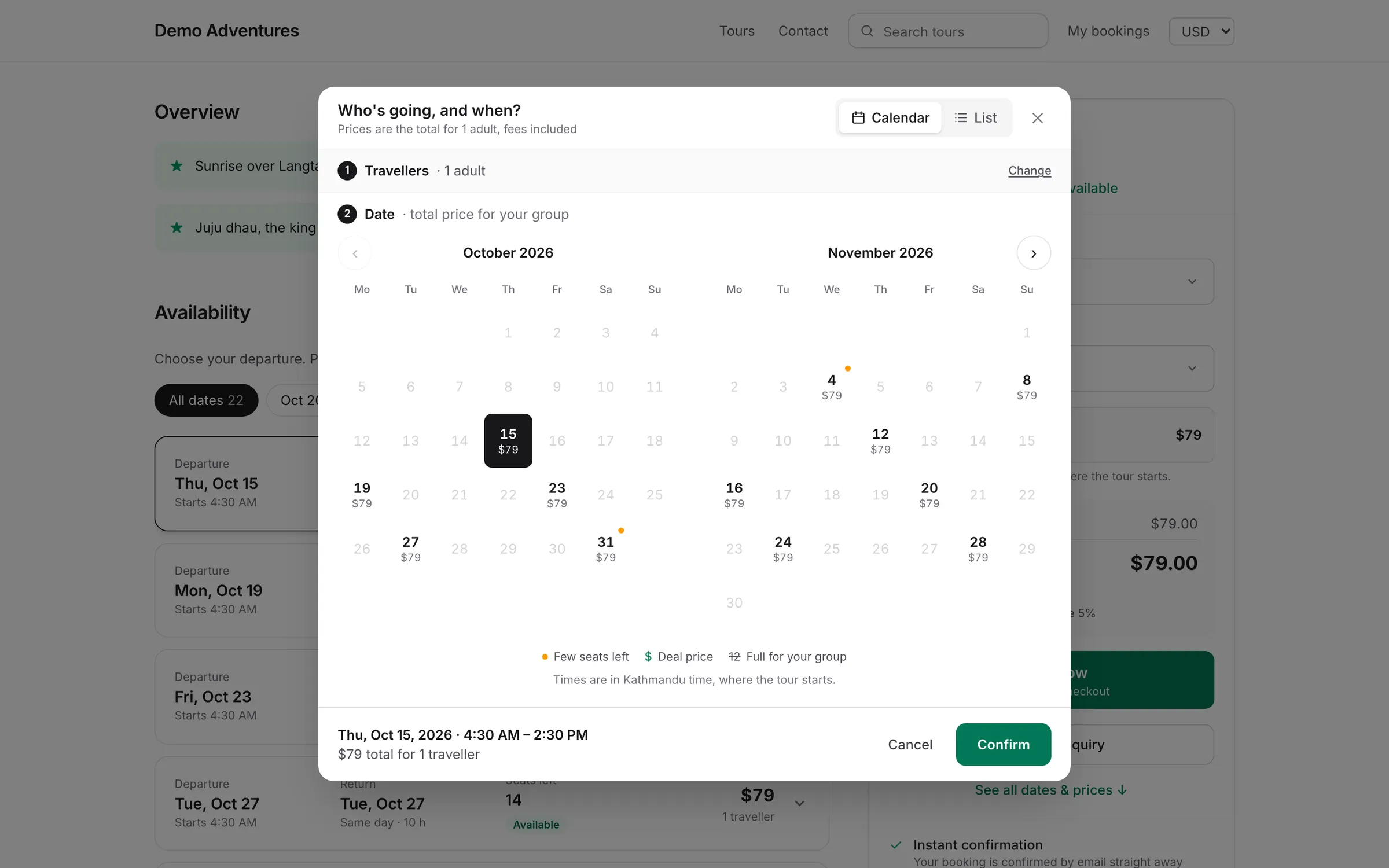
Overview
Departures & availability at a glance
A departure is one date and time of a tour option, with a fixed number of seats. Create a series in one go, for example every Saturday from November to March at 07:00 with 12 seats, and manage each departure on its own afterwards.
When a traveller continues to checkout, their seats are held for 30 minutes and counted as taken. Seat counts are checked inside the database at the moment of booking, so overbooking is impossible, even with many travellers booking at once.
Capabilities
What's included
-
Recurring departures
Pick a date range, weekdays, start time and seats, and create the whole season in one step.
-
Seat holds
Seats are held for 30 minutes during checkout and released automatically if the traveller doesn't pay.
-
Blocked dates
Close dates for holidays or closures; existing bookings are never touched.
-
Booking cut-off
Stop online bookings from one hour to two weeks before departure.
-
Stop and reopen sales
Close a single departure to new bookings without affecting existing ones.
-
Departures overview
Every departure across tours in a list or monthly calendar, with load and nearly-full alerts.
The problem: one seat, several ways to sell it
Most operators sell the same seats through more than one door: the website, the phone, email and walk-ins. When availability lives in a spreadsheet, two people can sell the last seat within minutes of each other, and someone has to make an awkward call.
Tourtify keeps one seat count per departure. Online checkouts, manual bookings added by your team and seats held during payment all draw from it, and the count is checked inside the database at the moment of booking. Two travellers cannot both take the last seat, however close together they press the button.
Worked example: planning a winter season
You run a day hike every Saturday from November to March, starting at 07:00, with one guide who can take 12 people. On the tour's Departures tab you set From 1 November, To 31 March, Weekdays Sat, Time 07:00 and Seats 12. The Add departures button tells you how many dates it will create before you confirm, so you can spot a wrong date range early.
Your office closes over Christmas, so under Blocked dates you block 24 to 26 December with the reason Office closed. The reason is only for you. Any Saturday in that range shows Closed and stops selling; bookings already made on it are not touched.
In February you hire a second guide for half-term. You open the two half-term departures and change their seats to 20. Every other departure keeps 12, because each departure has its own capacity.
Blocked dates, stop sales or a cut-off: which to use
Use blocked dates when the business or a resource is unavailable for a stretch of days: a holiday, a festival closure, a guide on leave. They work on a date range for that tour.
Use Stop sales on Operations › Departures when one departure should take no more bookings, for example because the bus is full even though seats remain, or because the weather forecast is poor. Reopen sales undoes it.
Use the booking cut-off on the Policies tab when you always need preparation time. Options run from until departure, through 1, 3 or 12 hours and 1 or 2 days, to 1 or 2 weeks before. A 2-day cut-off on a trek that needs permits stops online bookings that would arrive too late to arrange them, while your team can still add a late booking by hand.
How seat holds look from the traveller's side
Picture a departure with 12 seats and 10 already booked. Two travellers each want 2 seats. The first to choose Continue to checkout gets a 30-minute hold on the last 2 seats, and the checkout tells them their seats are held. The second traveller sees the departure as full and can send a sold-out date request, or join a waitlist if you use the Waitlist plugin.
If the first traveller pays within 30 minutes, the hold becomes a booking. If they close the tab, the hold expires and the 2 seats go back on sale automatically. Nobody on your team has to release them.
Reading the departures overview
Operations › Departures shows every departure across tours as a list or a monthly calendar. Next 7 days gives the travellers booked and the average load, and Full or nearly full lists upcoming departures that are 80% or more booked. Those are the dates to consider adding capacity or a second departure for.
Common mistakes: setting seats higher than your guides or vehicles can carry, on the basis that you can always cancel; cancelling bookings to close a date instead of stopping sales; and forgetting that the start time is in the tour's time zone, which matters if your team works from another country.
How it works
Departures & availability, step by step
- 1
Add a series
Choose dates, weekdays, time and seats.
- 2
Adjust
Change seats, block dates or set a cut-off.
- 3
Sell
Travellers see live availability and prices for every date.
- 4
Watch the load
See which departures are full or nearly full.
Integrations
Extend departures & availability
Switch these on in one click from your console.
Sales
Waitlist
Let travellers join a waitlist for full departures. When seats free up, the next in line whose group fits gets the seats held for a few hours, then they pass to the next.
Sales
Discounts
Every discount in one place, shown on your website and applied at checkout. Promo codes and automatic discounts (Starter): codes and links with rules and limits, and no-code discounts for early bird, last minute, minimum spend and travel dates. Group discounts and dynamic pricing (Growth): savings for bigger groups, and prices that move with demand and season.
Distribution
Channel manager (OTAs)
Sell on GetYourGuide, Viator and OCTO resellers such as Klook, Headout and Tiqets from one calendar. Availability and prices go out on every change, their bookings and cancellations come straight in, commission is recorded on each booking, and seats never oversell.
Do I need an option before I add departures?
Yes. Departures belong to a tour option, so add at least one option on the Pricing & options tab first.
Which time zone is the start time in?
The tour's time zone, whatever the time zone of the traveller or the person adding the departure.
How do I see which departures are nearly full?
Operations › Departures lists upcoming departures that are 80% or more booked under Full or nearly full.
What happens when a departure is full?
Travellers can send a sold-out date request, or join a waitlist with the Waitlist plugin.
Can I add a late booking by phone?
Yes. Manual bookings use the same seats and can be added after the online cut-off.
What if a payment arrives after seats are gone?
The booking is flagged so you can refund the traveller or add capacity.
Related features
Works well with
Start selling tours direct
Try Tourtify free for 30 days. Add your tours, pick a theme and take your first booking today.