Finance · Reports & dashboard
Know how your business is doing
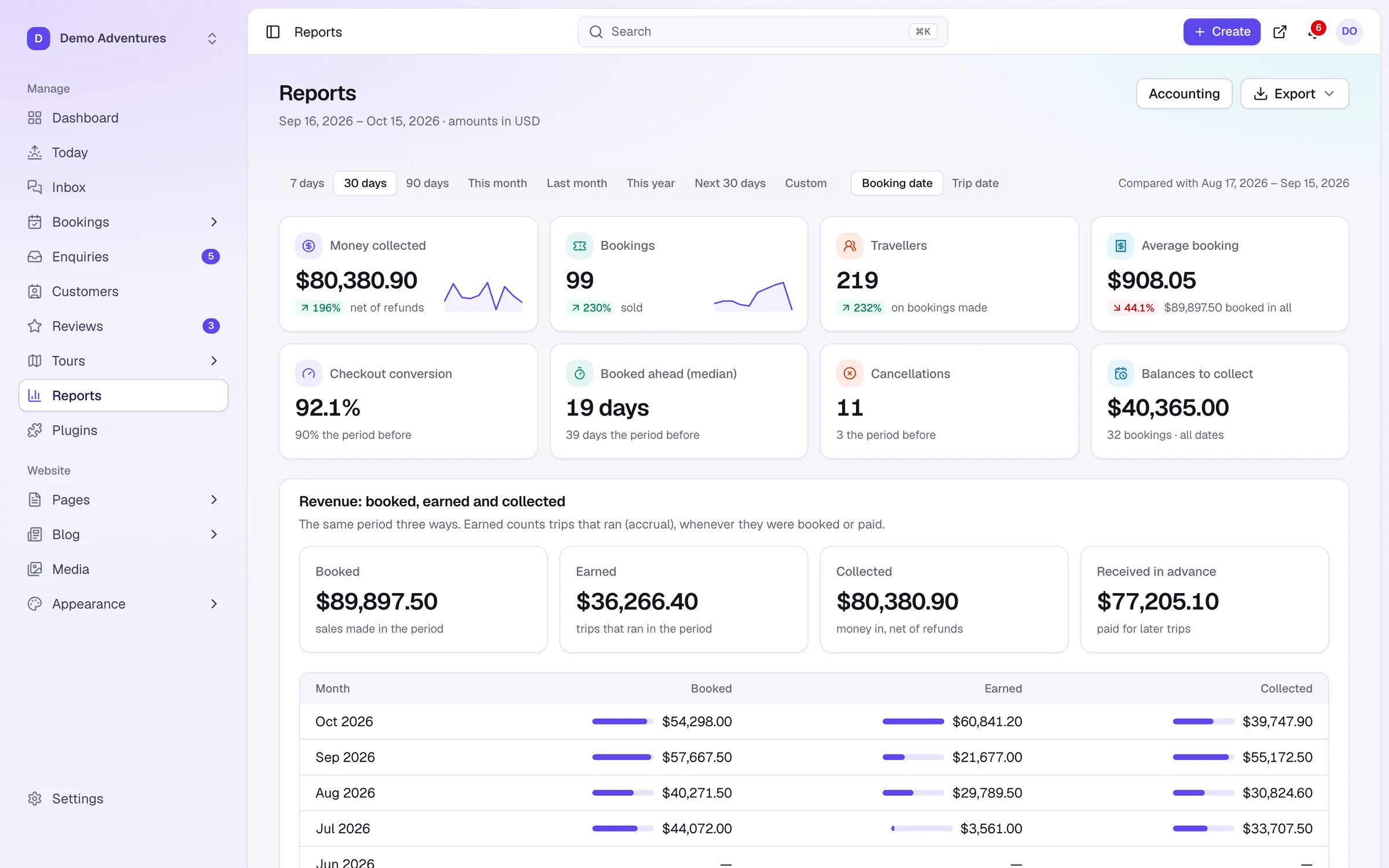
Revenue by booking date or by trip date, money collected, conversion and balances, compared with the period before, with PDF and CSV exports and scheduled report emails for your accountant.
Overview
Reports & dashboard at a glance
Pick a period, from seven days to a custom range, and every figure is compared with the period before of the same length. A chart shows money collected or bookings per day, with your best day highlighted.
For day-to-day work, the dashboard shows what needs attention: overdue balances, payments to check, new enquiries, reviews to approve and upcoming departures.
Capabilities
What's included
-
Key figures
Money collected, bookings, travellers, average booking, checkout conversion, booked ahead, cancellations and balances.
-
Comparisons
Every figure compared with the previous period of the same length.
-
Breakdowns
By tour, by channel, by payment status, and add-ons sold.
-
Multi-currency honesty
Bookings in other currencies are listed separately, never converted.
-
Booked, earned, collected
Revenue by booking date or by trip date (accrual), plus money received in advance, with twelve months side by side.
-
PDF and CSV
A report PDF, every booking as CSV, and summary, month, tour and channel sheets.
-
Scheduled emails
Daily, weekly or monthly reports emailed to up to ten people, with PDF or CSV attached.
-
Action dashboard
What needs attention today, in one place.
Three questions, three kinds of revenue
Tour operators are paid long before they deliver, which makes a single revenue figure misleading. Sales want to know what was sold this month. Your accountant wants to know what was earned. Your bank balance shows what was collected. Tourtify reports all three, plus money received in advance: money in hand for trips that have not run yet, which is a liability until they do.
Booked counts sales made in the period, whatever the trip date. Earned counts trips that ran in the period, whenever they were booked or paid. Collected counts money received in the period, net of refunds.
Worked example: one trek booking through the year
In March, two travellers book an October trek for 2,900 and pay a 580 deposit. The March report shows 2,900 booked, 580 collected and nothing earned. At the end of March, 580 is received in advance.
In August they pay the 2,320 balance, so August shows 2,320 collected and nothing booked or earned. In October the trip runs, and October shows 2,900 earned with nothing booked or collected. Across the year every figure adds up to 2,900; they simply land in different months, and the twelve-month table shows booked, earned and collected side by side so you can see the pattern.
Booking date or trip date
Count bookings by switches the whole report. By booking date, it describes what you sold: useful for judging marketing. By trip date, it describes what you delivered: use it with Last month for your accountant, or with Next 30 days to see what is coming up. Money collected always follows the payment date.
Booked ahead (median) tells you how far in advance travellers typically book. If it is around 60 days for a trek, a promotion for an October departure is better launched in summer than in September.
Breakdowns: where bookings come from
By tour shows bookings, travellers and revenue per tour, so you can see which trips carry the business. By channel separates your website from bookings added by staff and other channels, which tells you how much of your work still arrives by phone and email. By payment status shows how much is paid in full, part paid or not paid yet.
Bookings in other currencies are listed separately under Also booked in other currencies and never converted. That keeps the figures honest: an exchange rate chosen by software would not match what your bank actually paid.
Getting the numbers to your accountant
Export gives you a PDF report, a CSV with one booking per row, and headline, month, tour and channel sheets. Schedule a report to send it automatically: monthly on the 1st covers the month before, and you choose the hour in your business's time zone. Add up to ten addresses; recipients do not need a Tourtify login.
Common mistakes: sending a trip-date report when your accountant expected booking date, so agree which they want; using Reports to export a single tour's bookings, when Export on the Bookings list does filtered exports; and reading a short custom period against a long one, which the automatic comparison with a period of the same length avoids.
Dashboard for today, reports for trends
Reports and the dashboard answer different questions. The dashboard is for today: overdue balances, payments to check, new enquiries, reviews to approve and upcoming departures. Reports are for trends: how this month compares with the last, which tours carry the business and when travellers book.
Look at the dashboard every morning and at reports once a week or once a month. The daily chart of money collected or bookings, compared with the period before and with your best day marked, is the quickest way to see whether a promotion changed anything.
How it works
Reports & dashboard, step by step
- 1
Choose a period
7, 30 or 90 days, this year or custom.
- 2
Read the trends
Compared with the period before.
- 3
Export or schedule
Download PDF or CSV, or email it automatically every month.
Integrations
Extend reports & dashboard
Switch these on in one click from your console.
Accounting
Costs & profit
Record what each departure costs: drivers, hotels, park fees, meals. Default costs per tour fill in automatically, guide pay and agent commission are counted, and you see the real profit, margin and break-even of every departure and tour.
Accounting
Xero
Sends every sale, payment, refund and credit note to Xero as it happens, booked to the accounts and tax rates you choose. No more CSV imports.
Accounting
QuickBooks Online
Sends every sale, payment, refund and credit memo to QuickBooks Online as it happens, booked to the accounts and tax codes you choose. No more CSV imports.
Marketing
Google Analytics 4
Measure visits and bookings with GA4: tour viewed, checkout started, payment method chosen and booking purchased, with its value. Loads only after visitors accept cookies (Consent Mode v2), and can report purchases from our server so ad blockers and payment redirects don’t lose them.
Does my accountant need a Tourtify login?
No. Scheduled reports are emailed to up to ten addresses, with PDF and CSV attached if you choose.
What is money received in advance?
Money received by the end of the period for trips after it. It is a liability until the trip runs.
What happens if a scheduled email fails?
The schedule shows Last send failed and the send is retried automatically. You can also choose Send now.
Who can see reports?
Anyone who can view bookings, plus access groups that include bookings. Scheduled emails need finance access.
What is revenue by trip date?
Accrual reporting: a booking counts in the month the trip runs, not the month it was booked, which is what most accountants want.
Are refunds included?
Money collected is shown net of refunds.
Can I export a filtered list?
Yes, use Export on the Bookings list for a filtered export.
Related features
Works well with
Start selling tours direct
Try Tourtify free for 30 days. Add your tours, pick a theme and take your first booking today.